macOS App

Trans2: selected-text and screenshot translator for Mac

Select text in your current Mac window or capture text you cannot copy, then open the translation panel with a shortcut. Trans2 brings selected-text translation, screenshot OCR, and live system audio captions to your menu bar for reading, software interfaces, and foreign-language audio.

Trans2 Pro

Sentence translation and word definitions

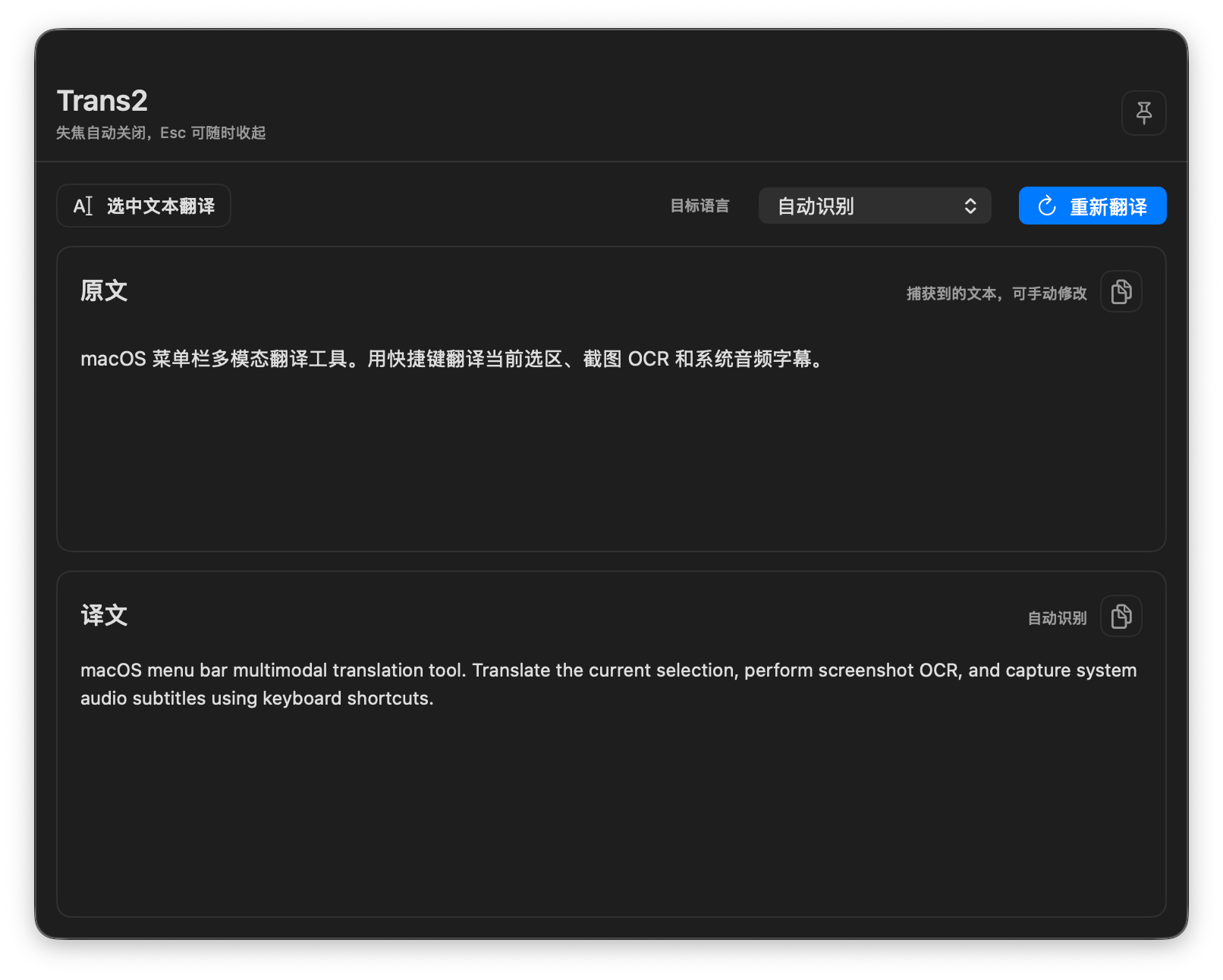
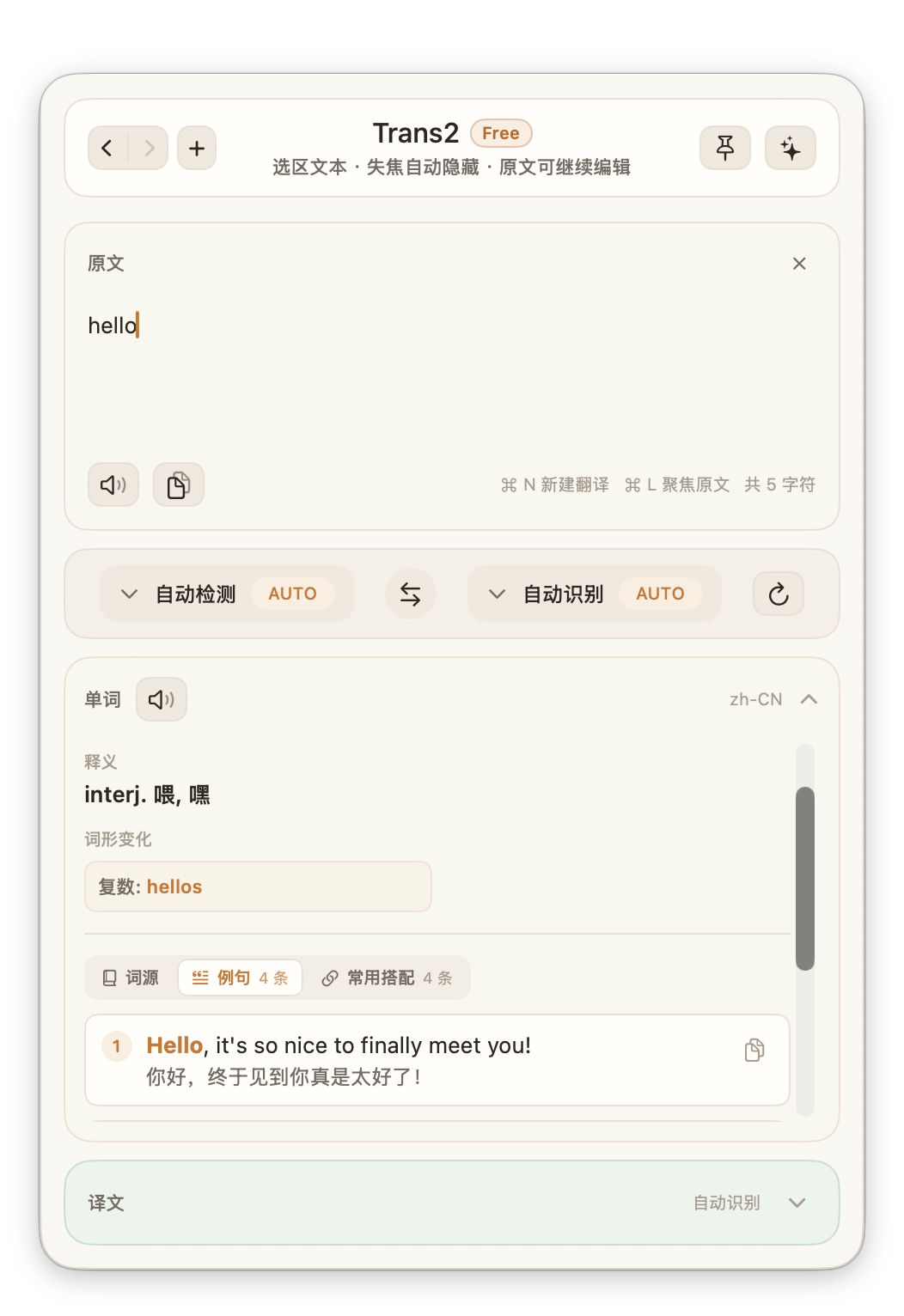
Selected text and OCR screenshots open a dedicated translation panel. System audio translations appear in a floating caption window.

Trans2 sentence translation panel showing source text and its translation on macOS
Trans2 word panel showing word definitions on macOS
Capabilities

From selected text and screenshots to system audio.

Trans2 is a standalone macOS app. Free covers desktop reading and OCR, while Pro adds follow-up questions in the translation panel and live subtitle translation.

Translate selected text

Press ⌥D by default to read the current selection, open the dedicated translation panel, and translate automatically.

Free
Screenshot OCR translation

Press ⌥S by default to select a screen area, recognize text with Vision OCR, and translate text that cannot be copied.

Free
Ask AI

Ask follow-up questions, get explanations, organize ideas, and rewrite the source and translation in the translation panel. Available with Pro once account connection is restored.

Pro
Live subtitle translation

Press ⌥A by default to capture system audio, transcribe it with Speech, and display translations in a draggable floating caption window.

Pro

Read, capture, and translate audio on your Mac

Choose selected text, a screenshot, or system audio based on the content you are working with.

Translate selected text on Mac: reading and email

When reading foreign-language documents, web passages, or email, select the text you want to understand and open the translation panel.

  1. Select text that can be copied.
  2. Press the default shortcut ⌥D to open the translation panel.
  3. Read the translation. For explanations or rewrites, ask follow-up questions about the source with Ask AI in Pro.

Ask AI is a Pro feature and will be available once account connection is restored.

Screenshot translator for Mac: images and scanned text

For text you cannot select in images, software interfaces, or scanned PDFs, capture the visible area and translate the text recognized by OCR.

  1. Press the default shortcut ⌥S.
  2. Select the screen area containing the text.
  3. Read the text recognized by Vision OCR and its translation.

This workflow translates a captured area. It does not produce a translated PDF file with the original document layout.

Live translation on Mac: meetings, courses, and video

For foreign-language audio playing on your computer, Pro can transcribe and translate system audio in a draggable floating caption window.

  1. Play the audio you want to understand on your Mac.
  2. Press the default shortcut ⌥A to start system audio translation.
  3. Move the caption window to a convenient position and read along with the audio.

Captions come from system audio recognition. This does not modify native YouTube subtitles or translate SRT or ASS subtitle files.


Questions about using Trans2

Understand the workflow, Free and Pro features, and how translation data is handled.

Is Trans2 a Safari webpage translation extension?

Trans2 is a standalone macOS menu bar app. Use selected-text translation for text you can copy from a webpage, or try screenshot OCR for text you cannot select. These are selected-text and screenshot workflows, rather than a full-page bilingual layout extension.

Can I translate email or ask AI about a translation?

Select email text and press ⌥D to read the translation. Ask AI lets you ask follow-up questions, get explanations, or rewrite the current source and translation. It is a Pro feature and will open once account connection is restored.

Does on-device screenshot OCR mean fully offline translation?

Screenshot text recognition runs locally on your Mac, but the recognized text enters your chosen translation service. The default Trans2 AI provider sends text to BitBear’s translation service. Local OCR does not mean fully offline translation.

What is included in Free and Pro?

Free covers selected-text translation and screenshot OCR. Pro adds Ask AI and live system audio captions. Website sign-in and app connection are currently paused, and website Pro purchases are temporarily unavailable.

Read about Trans2 privacy and data handling

Need translation for Telegram group chats?

TransChat is a separate product focused on real-time translation for Telegram groups.

Explore TransChat